#ALERT: Unauthorized sellers on marketplace platforms are impersonating iShopChangi. Please purchase only from our official website, iSho...
Show More
More

- Home/
- Electronics/
- Computers & Peripherals/
- Computer Accessories/
- Anker Nano 13-in-1 Docking Station A83C3
PageMetaconfiguration


1
9

ANKER
Anker Nano 13-in-1 Docking Station A83C3
Estimated CR Points:
Earn 260 Points
Options
Colour: Black
Shop from 30 days to 96 hours before departure. Collect your orders at the iShopChangi Collection Centre in the Departure Transit Area. Brand paper bags are not provided.
S$263.00
S$351.00
Options
Quantity
Limited Availability
Shop from 30 days to 96 hours before departure. Collect your orders at the iShopChangi Collection Centre in the Departure Transit Area. Brand paper bags are not provided.
In-store Price Assurance
30 Days Refund*
Authenticity Guaranteed
Fulfilled by:
S$263.00
S$351.00
Quantity
Limited Availability
 In-store Price Assurance
 30 Days Refund*
 Authenticity Guaranteed
Fulfilled by:
Learn more about the item
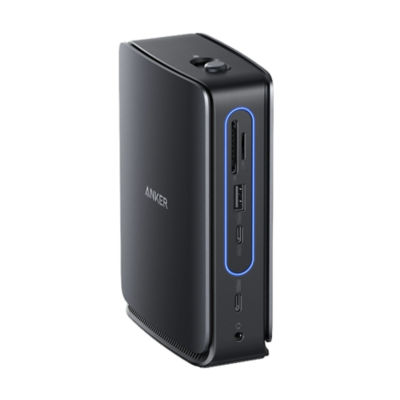
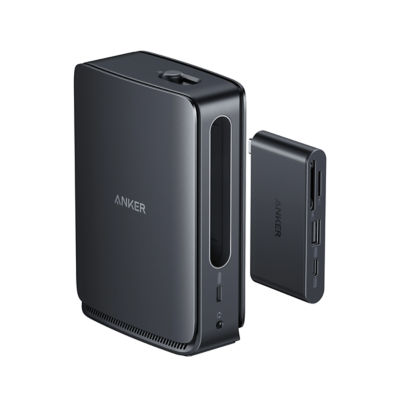
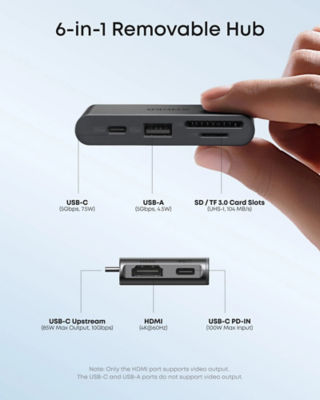
● 3-in-1 Dock with Detachable Hub: Switch effortlessly between full desktop setups and mobile work with a 13-in-1 dock for every connection plus a detachable 6-in-1 hub for quick, on-the-go access.
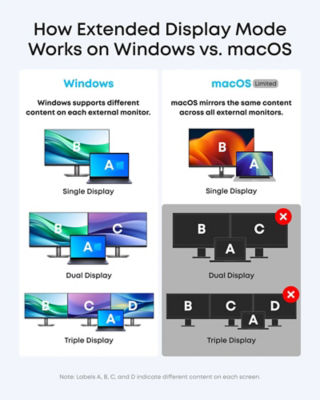
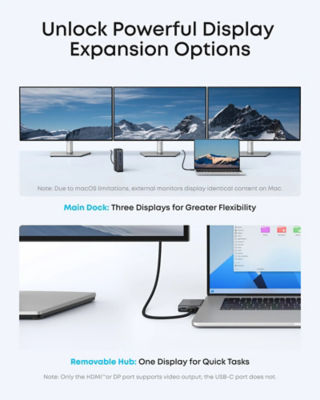
● Flexible Display Options with Main Dock and Removable Hub: Set up a triple-screen workstation with the dock or connect one display through the hub when working away from your desk. (Note: On macOS, all external monitors mirror the same content. Only the HDMI or DisplayPort supports video output. The USB-C does not support video output.)
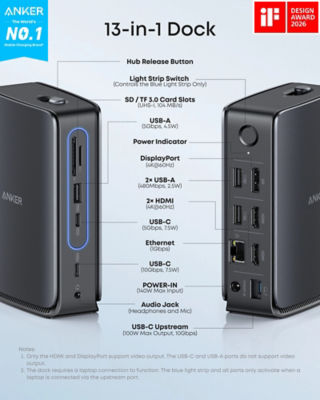
● All the Connections You Need: Features a USB-C upstream port, two USB-C data ports, three USB-A data ports, dual HDMI and DisplayPort outputs supporting up to 4K resolution, an Ethernet port, audio jack, SD and TF card slots, and a DC input port. The detachable hub adds essential ports for convenient access on the go.
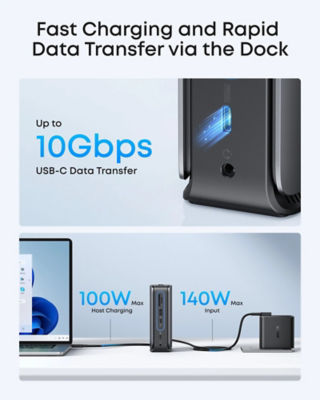
● Fast Power Delivery and Data Transfer: Deliver up to 100W to your laptop while transferring data at speeds up to 10 Gbps via USB-C. The dock supports up to 140W max input from the included power adapter to maintain stable power for all connected devices.
Note:
- For some laptop models, the hub may still block adjacent ports. Please check the dimensions before purchasing to ensure compatibility.
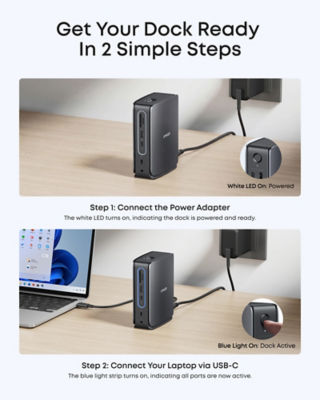
- The dock requires a laptop connection to function. The blue light strip and all ports only activate when a laptop is connected via the upstream port.
- To resolve display issues, please update your dock to the latest firmware to ensure full compatibility with your connected devices.
- To make the Ethernet work on your Windows laptop, please download the latest Realtek driver for the dock.
● Flexible Display Options with Main Dock and Removable Hub: Set up a triple-screen workstation with the dock or connect one display through the hub when working away from your desk. (Note: On macOS, all external monitors mirror the same content. Only the HDMI or DisplayPort supports video output. The USB-C does not support video output.)
● All the Connections You Need: Features a USB-C upstream port, two USB-C data ports, three USB-A data ports, dual HDMI and DisplayPort outputs supporting up to 4K resolution, an Ethernet port, audio jack, SD and TF card slots, and a DC input port. The detachable hub adds essential ports for convenient access on the go.
● Fast Power Delivery and Data Transfer: Deliver up to 100W to your laptop while transferring data at speeds up to 10 Gbps via USB-C. The dock supports up to 140W max input from the included power adapter to maintain stable power for all connected devices.
Note:
- For some laptop models, the hub may still block adjacent ports. Please check the dimensions before purchasing to ensure compatibility.
- The dock requires a laptop connection to function. The blue light strip and all ports only activate when a laptop is connected via the upstream port.
- To resolve display issues, please update your dock to the latest firmware to ensure full compatibility with your connected devices.
- To make the Ethernet work on your Windows laptop, please download the latest Realtek driver for the dock.

