提醒:目前有商家未经授权冒用iShopChangi名义销售商品。iShopChangi仅通过官网iShopChangi.com及樟宜我爱购微信小程序销售,未授权任何其他渠道。请认准官方,谨防非正规渠道购买。

- 主页/
- 数码产品/
- 相机 & 无人机/
- 相机三脚架 & 稳定器/
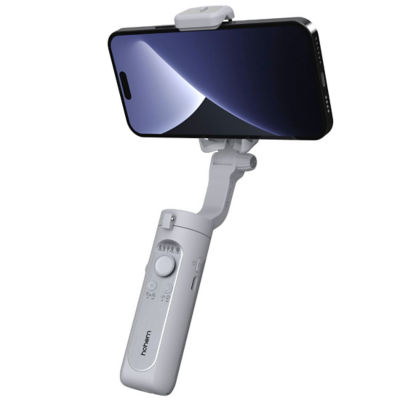
- Hohem iSteady XE 3-Axis Palm Smartphone Gimbal
PageMetaconfiguration


1
5




46%折扣
HOHEM
Hohem iSteady XE 3-Axis Palm Smartphone Gimbal
预计樟宜奖励计划积分:
赚 60 积分
在抵达新加坡前 30 天至 72 小时内,或抵达后最多 30 天内下单,并配送至您在新加坡的地址。订单处理前,请上传抵达航班的登机牌副本以供核验。
S$69.00
S$129.00
数量
数量有限

 与门店同价保证
 30日退款保证*
 正品保证
正品保证
发货单位:
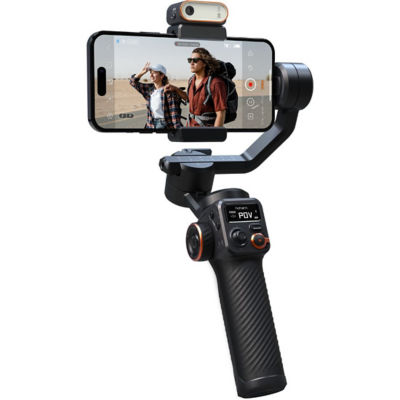




了解更多商品信息
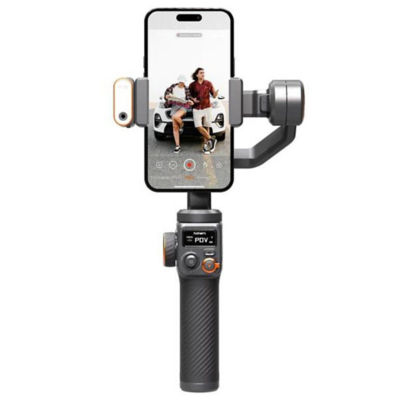
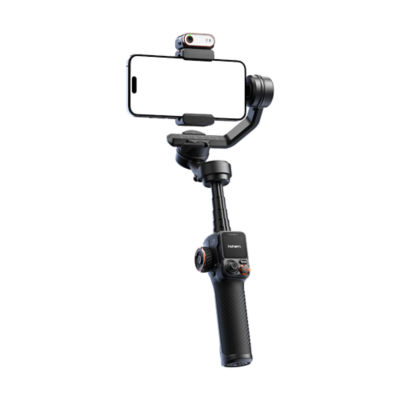
Upgraded Stabilization iSteady 7.0 Algorithm.
The newest iSteady 7.0 stabilization system takes your smartphone shooting to the next level, allowing you to create smooth on-the-move footage with ease. It is improved by 30% as anti-shake as the previous generation and has more powerful motors that operate more efficiently.
Lighter Weight Better Hold
Weight 259g
This is the most lightweight.
3-axis smartphone gimbal for creators on the move.
As Compact as an iPhone
Tiny enough to fit in the pocket, so you can easily take it along for any adventure.
Carry Large Smartphone with High-Torque Motor
The motor torques have been improved by 30%, ensuring that your phone can stay where it needs to be, even when carrying larger smartphones.
Compatible with Almost All Sizes of Smartphone
iPhone, HUAWEI, Xiaomi, OPPO, VIVO...
Independently Magnetic Fill Light
Magnetic Installation
Cold/Warm/Natural White Light
10-Level Adjustable Brightness
Still works without being magnetized to iSteady XE
Simplified Control
Quickly enable Inception Mode (spin shot) by simply pressing the function button three times.
Quickly switch between Landscape and Portrait Mode by pressing function button once.
Quickly switch between gimbal modes (PF/PTF/L/POV) by simply pressing M button once
Motor Protection
The motor can be protected from damage caused by improper operation by having the gimbal powered off automatically.
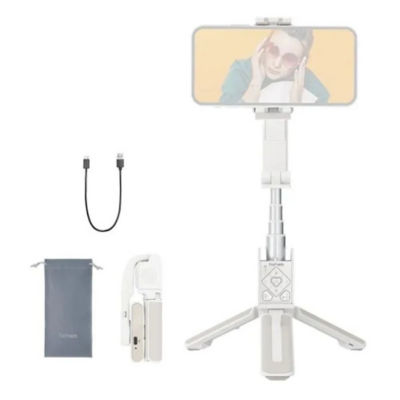
Standard Accessory
Tripod, Carrying Case, USB-C Charging Cable
M Button
Press and hold for 3s: Power on/off gimbal.
Press once: Switch between working modes (PTF-PF-L-POV)
Press twice: Standby mode (Press any button to exit)
Working Mode Indicator
Battery Level Indicator
Display gimbal mode: If one of working modes is in use, its mode light will be in solid green.
Display battery level: Long pressing Function button to check out battery level.
***Mobile Phone is not included***
The newest iSteady 7.0 stabilization system takes your smartphone shooting to the next level, allowing you to create smooth on-the-move footage with ease. It is improved by 30% as anti-shake as the previous generation and has more powerful motors that operate more efficiently.
Lighter Weight Better Hold
Weight 259g
This is the most lightweight.
3-axis smartphone gimbal for creators on the move.
As Compact as an iPhone
Tiny enough to fit in the pocket, so you can easily take it along for any adventure.
Carry Large Smartphone with High-Torque Motor
The motor torques have been improved by 30%, ensuring that your phone can stay where it needs to be, even when carrying larger smartphones.
Compatible with Almost All Sizes of Smartphone
iPhone, HUAWEI, Xiaomi, OPPO, VIVO...
Independently Magnetic Fill Light
Magnetic Installation
Cold/Warm/Natural White Light
10-Level Adjustable Brightness
Still works without being magnetized to iSteady XE
Simplified Control
Quickly enable Inception Mode (spin shot) by simply pressing the function button three times.
Quickly switch between Landscape and Portrait Mode by pressing function button once.
Quickly switch between gimbal modes (PF/PTF/L/POV) by simply pressing M button once
Motor Protection
The motor can be protected from damage caused by improper operation by having the gimbal powered off automatically.
Standard Accessory
Tripod, Carrying Case, USB-C Charging Cable
M Button
Press and hold for 3s: Power on/off gimbal.
Press once: Switch between working modes (PTF-PF-L-POV)
Press twice: Standby mode (Press any button to exit)
Working Mode Indicator
Battery Level Indicator
Display gimbal mode: If one of working modes is in use, its mode light will be in solid green.
Display battery level: Long pressing Function button to check out battery level.
***Mobile Phone is not included***

